Call an endpoint
Start only after the model is Running, its detail page shows an endpoint, and Copy as cURL contains a complete request.
Send the first request
Section titled “Send the first request”-
Create an Inference API key.
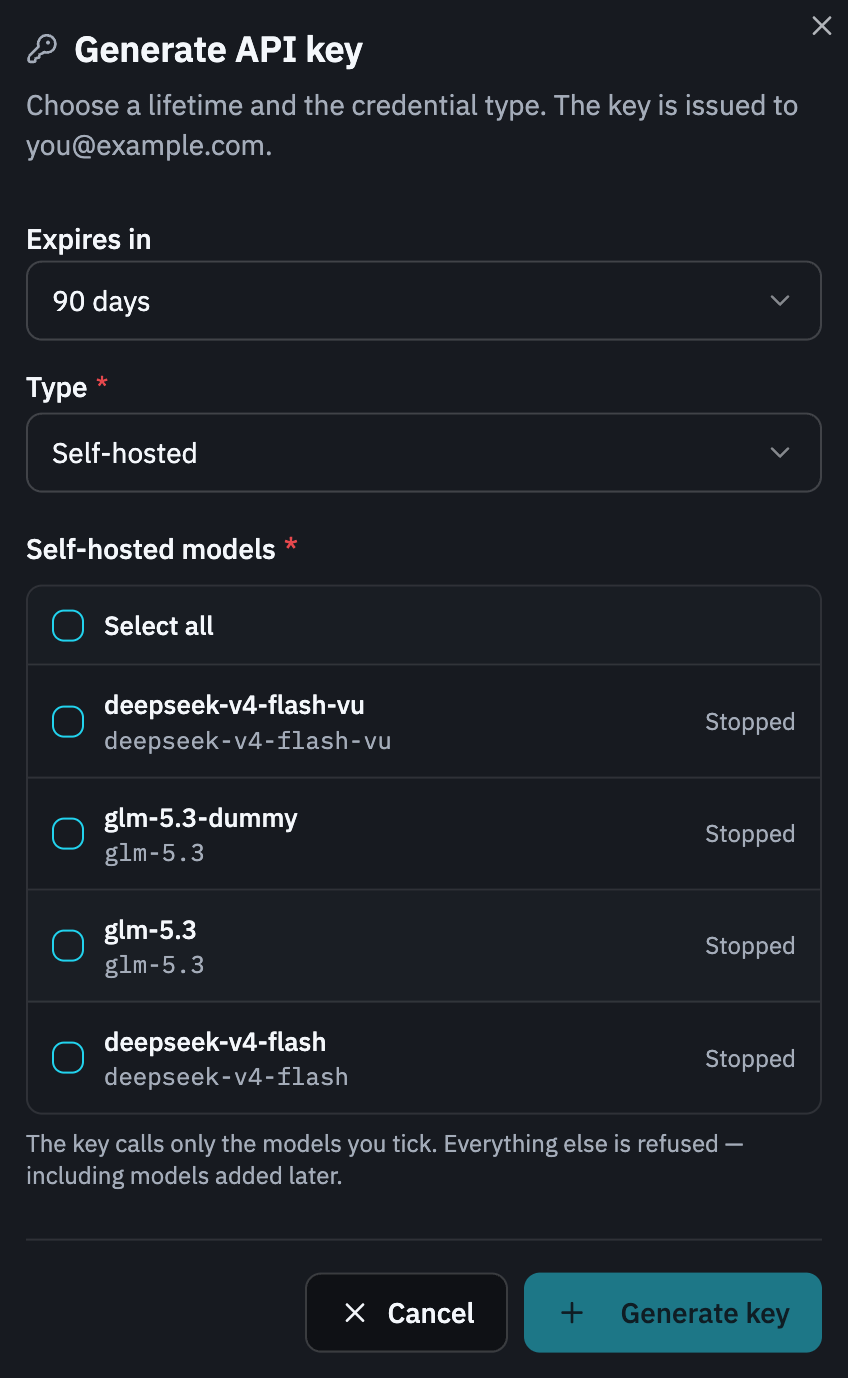
Open Inference → API Keys → Generate API key. Choose an expiry, set Type to Self-hosted, and tick the model you want to call.
Selecting a model authorizes its Served Model Name, not only that one resource. A replacement in the same tenant that continues using the same Served Model Name shares access; every other Served Model Name is refused. Deleting a model is not a substitute for revoking the key.
A Platform key is the wrong credential here: it cannot call tenant self-hosted models.
Copy the secret from the success dialog. It cannot be displayed again.
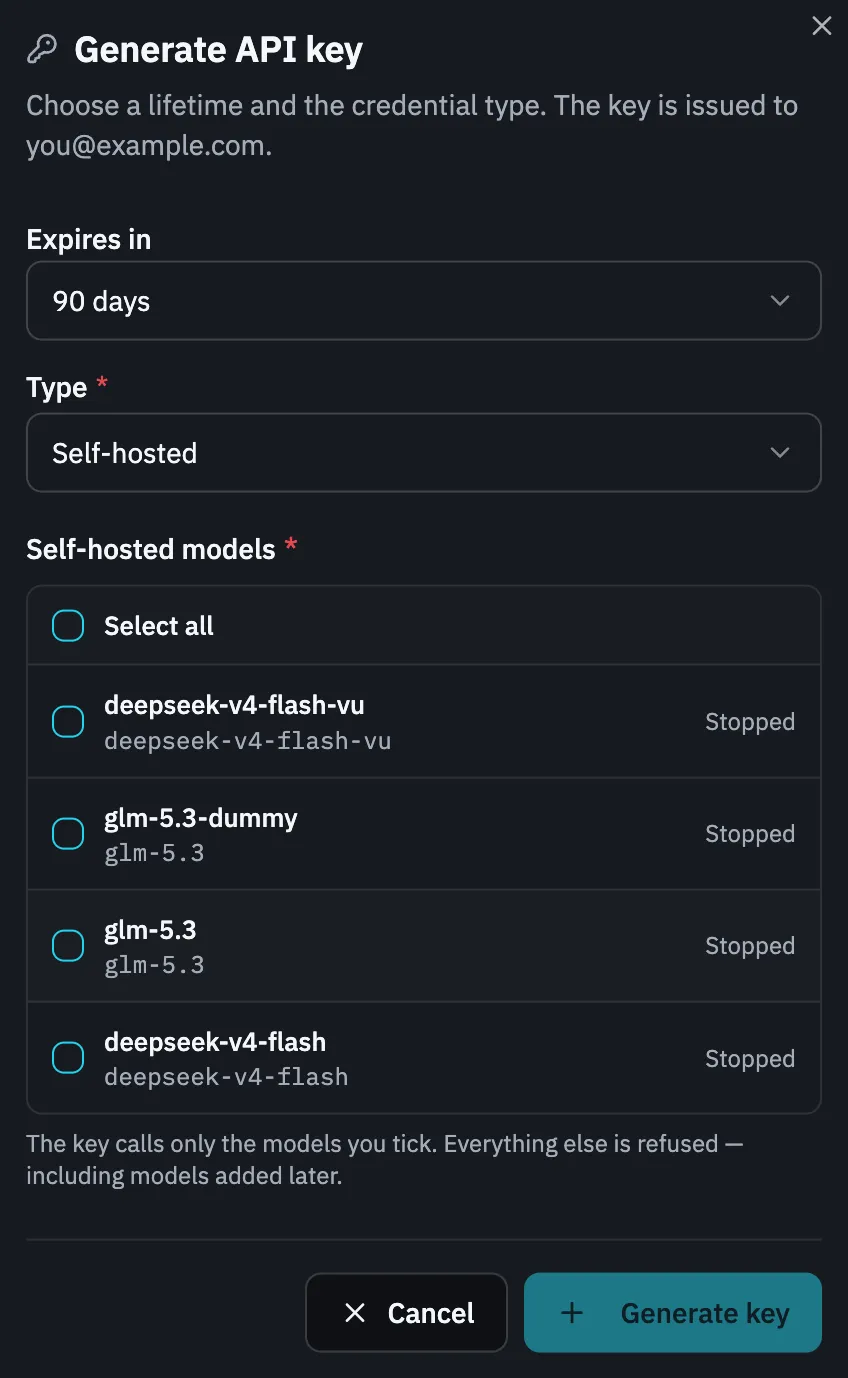
The model list only appears once Type is Self-hosted. A Platform key has no list, because it cannot be narrowed.
-
Copy the tenant endpoint and Served Model Name.
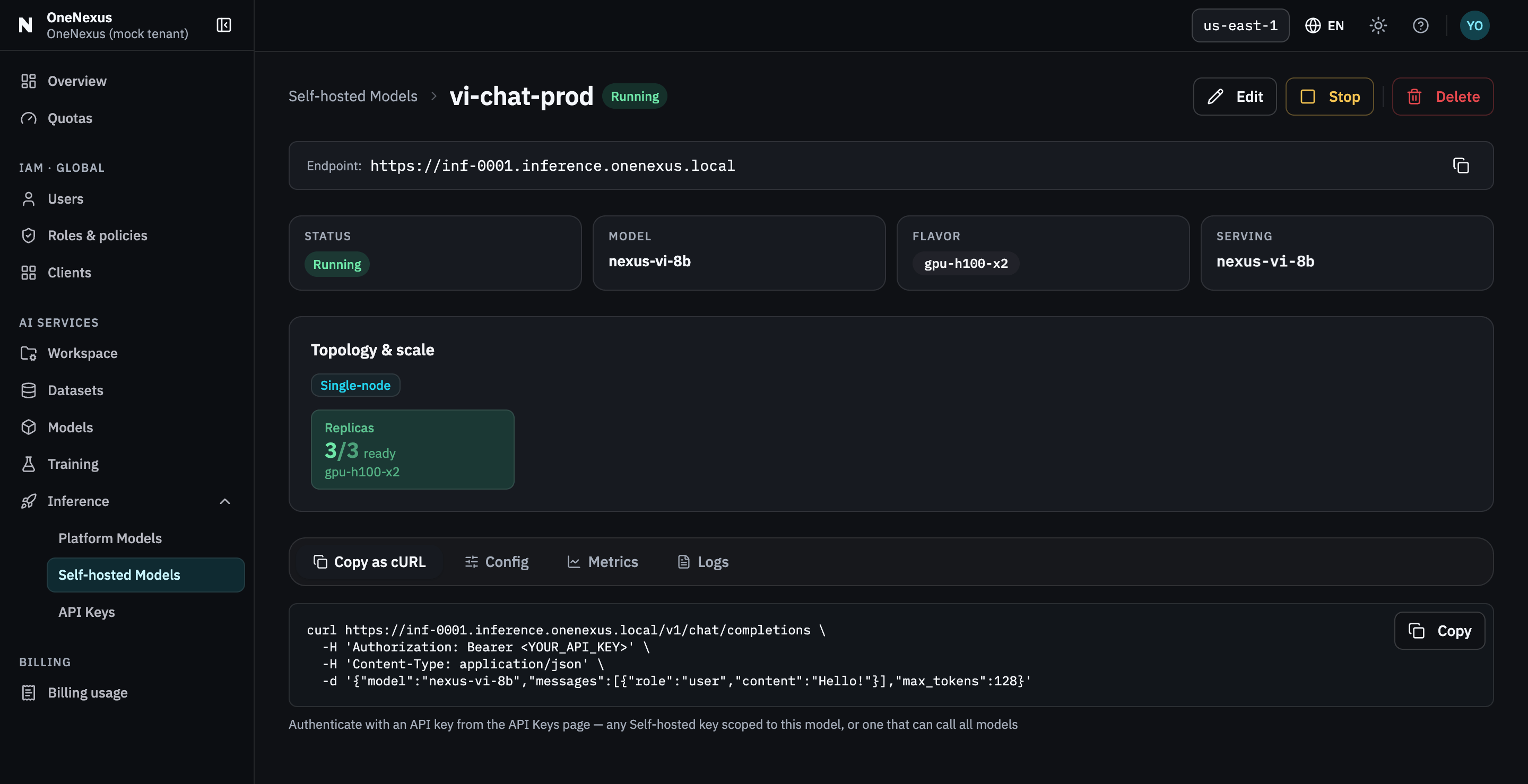
Open the model, copy the Endpoint at the top of the detail page and the model string used by Copy as cURL; it must match the model’s Served Model Name exactly.
Do not use the model’s resource name, Hugging Face repository, or a Platform catalog Public model ID unless the generated cURL explicitly uses that same string.
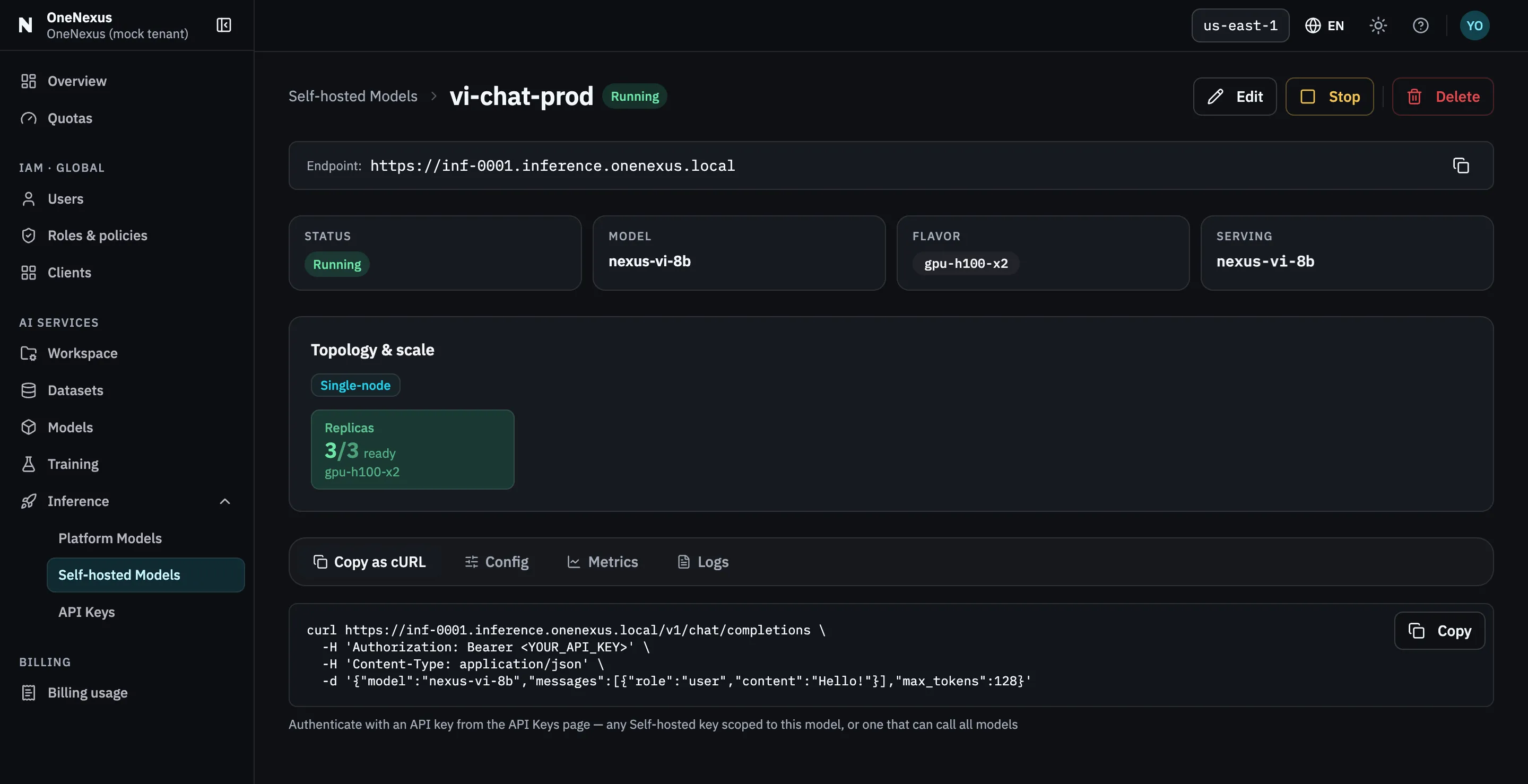
Two values, one screen: the endpoint at the top, and the
modelstring inside the generated command. -
Set local environment variables.
Replace both placeholders with the copied values.
ONX_ENDPOINTis the tenant endpoint shown on the model detail page, without an added/v1suffix.Bash or zsh
Terminal export ONX_ENDPOINT="<copied-endpoint>"export ONX_SERVED_MODEL="<served-model-name>"Run the key prompt separately and paste the secret when prompted:
Terminal printf "OneNexus Inference API key: "; IFS= read -rs ONX_INFERENCE_API_KEY </dev/tty && export ONX_INFERENCE_API_KEY && printf "\n"PowerShell
PowerShell $env:ONX_ENDPOINT = "<copied-endpoint>"$env:ONX_SERVED_MODEL = "<served-model-name>"$secret = Read-Host "OneNexus Inference API key" -AsSecureString$env:ONX_INFERENCE_API_KEY = [System.Net.NetworkCredential]::new("", $secret).PasswordRemove-Variable secret -
Verify the generated request first.
The model’s Copy as cURL command is the source of truth for the endpoint, path and
modelvalue. Do not paste the raw key into that command: it can be retained in shell history. In Bash or zsh, keep the securely read environment variable from step 3 and replace the generated command’s entire authorization header with-H "Authorization: Bearer $ONX_INFERENCE_API_KEY". Leave its other values unchanged.The resulting Bash/zsh request is:
cURL curl "$ONX_ENDPOINT/v1/chat/completions" \-H "Authorization: Bearer $ONX_INFERENCE_API_KEY" \-H "Content-Type: application/json" \-d "{\"model\": \"$ONX_SERVED_MODEL\",\"messages\": [{\"role\": \"user\", \"content\": \"Say hello in one sentence.\"}]}"API success is a
2xxresponse with a valid Chat Completions envelope; a complete final-answer result has a non-emptychoicesarray and assistant content underchoices[0].message.content. If final text is empty, inspect the full response before retrying; some models can return reasoning without final content. -
Call the same endpoint with Python.
Install the SDK:
Terminal python -m pip install openaiSave this as
endpoint_call.pyand runpython endpoint_call.py:endpoint_call.py import osfrom openai import OpenAIendpoint = os.environ["ONX_ENDPOINT"].rstrip("/")client = OpenAI(base_url=f"{endpoint}/v1",api_key=os.environ["ONX_INFERENCE_API_KEY"],)response = client.chat.completions.create(model=os.environ["ONX_SERVED_MODEL"],messages=[{"role": "user", "content": "Say hello in one sentence."}],)print("Success:", response.choices[0].message.content)Success prints a model-generated message prefixed with
Success:.
Keep the tuple together
Section titled “Keep the tuple together”Treat these three values as one configuration unit:
- tenant endpoint shown on the model detail page;
- Inference API key authorizing that model’s Served Model Name; and
- exact Served Model Name.
A common failure is combining two correct values from one model with a third value from the Platform catalog or another model.
Before application integration
Section titled “Before application integration”- Keep the key in a server-side secret store or protected environment variable, never in a browser bundle or repository.
- Set an application timeout.
- Do not retry
401,403, validation4xx, or404unchanged. - Retry transient
429or503responses only a bounded number of times with exponential backoff and jitter. - If streaming has already emitted data, do not automatically replay the whole request.
See the API reference for the request contract, or troubleshooting if the generated cURL does not succeed.