Operate a model
Use the model detail page as the source of truth. Its status and ready replica counts can change while provisioning, restarting, or applying an edit.
Read the lifecycle
Section titled “Read the lifecycle”| Status | Meaning | What to do |
|---|---|---|
Pending | The create request was accepted; no runtime is ready yet | Wait, or use Delete if the model is no longer needed |
Scheduling | Runtime resources are being admitted and scheduled | Wait; inspect Logs if progress stops |
Warming | Model assets are loading | Wait; startup duration depends on the model and configuration |
Deploying | Serving resources or a new revision are progressing | Keep watching status, ready replicas, and Logs |
Running | The route is published | Call the endpoint; check ready replicas if the page reports a degraded phase |
Restarting or Stopping | A lifecycle action is still in progress | Do not issue another conflicting action |
Stopped | The runtime is offline and requests are not served | Edit, Restart, or Delete |
Failed | Provisioning or a lifecycle operation did not converge | Read the status reason and Deploy diagnostics, then use an action the Console offers |
Finalizing | This model’s route update and runtime teardown are still in progress | Stop sending traffic to this model and wait. If another model serves the same Served Model Name, that route can remain callable |
Finalized | This model’s route update and runtime teardown have completed | This model no longer serves requests. A same-name route can remain callable through another model; delete the remaining record when offered |
Deleting | Permanent teardown is in progress | Wait for the list/detail page to confirm the resource is gone |
Delete failed | Teardown could not finish | Retry Delete after checking the reported error |
For client rollout, use the strict readiness gate: Running + endpoint present + complete Copy as cURL sample.
Scale or update configuration
Section titled “Scale or update configuration”Choose Edit on the detail page.
- For a single-node model, change Replicas to a whole number of at least
1. - For a prefill/decode model, change the prefill and decode replica counts separately.
- Scaling adds or removes replicas in place; existing replicas are not restarted for a replica-only change.
- Runtime changes create a new revision and roll the model. Review the How to apply descriptions in the Console before saving; a single-replica model can be unavailable while it reloads.
- If the model is
Stopped, edits are saved and take effect on the next Restart.
The current edit flow does not change the bound model, resource name, Served Model Name, or Flavor. Deploy another model when one of those values must change.
Do not change runtime tuning, image, environment, or engine flags by trial and error. Start from the model recipe and use a configuration validated for that model and Flavor.
Observe the model
Section titled “Observe the model”Use the tabs for different questions:
- Copy as cURL — the current callable host, path, and Served Model Name.
- Config — the requested serving configuration. Runtime details can be restricted to catalog admins.
- Metrics — live pool health, ready/desired replicas, and the available metrics board.
- Logs — deploy diagnostics and serving output. Start here for
Failed, a stalled rollout, or repeated503responses.
An empty panel is not proof of a healthy or unhealthy model. Correlate status, ready replicas, endpoint availability, request results, Metrics, and Logs.
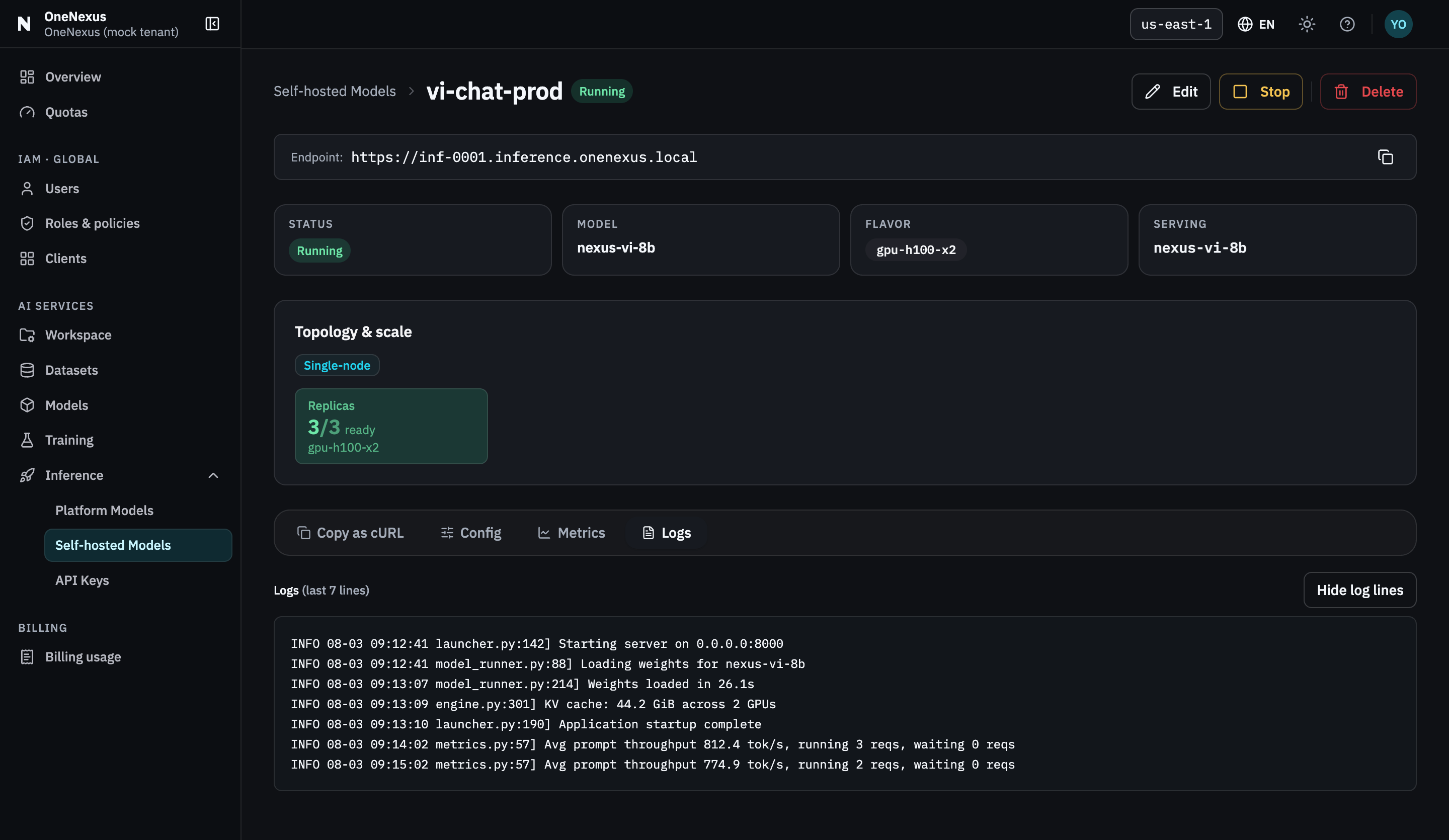
The four tabs sit under the topology card. Logs is where a stalled rollout or a repeated 503 explains itself.
Stop, restart, or delete
Section titled “Stop, restart, or delete”| Action | Use it when | Result |
|---|---|---|
| Stop | You want the model offline but may use it again | Requests stop; the model record and configuration remain |
| Restart | A model is Stopped, or the Console offers recovery from Failed | Runtime provisioning starts again; wait for the full readiness gate |
| Delete | You are finished with the model | This model is removed. The tenant endpoint and same-name route can remain for other models; the action cannot be undone |
Delete can supersede a model still provisioning. Pending has no runtime to stop, so use Delete, not Stop, to cancel immediately after creation.
Cleanup checklist
Section titled “Cleanup checklist”When the model is no longer needed:
- Save any diagnostics you are authorized to retain.
- Choose Delete and confirm the irreversible action.
- Wait until the model disappears from the list or the detail page reports that it no longer exists.
- Review Inference → API Keys. An Inference key selected through this model authorizes its Served Model Name, so a replacement that continues using that name can still use it. Delete does not revoke the key; revoke it explicitly when that Served Model Name should no longer be authorized.
- Remove the endpoint and key from local environment variables, application configuration, and secret stores that no longer need them.
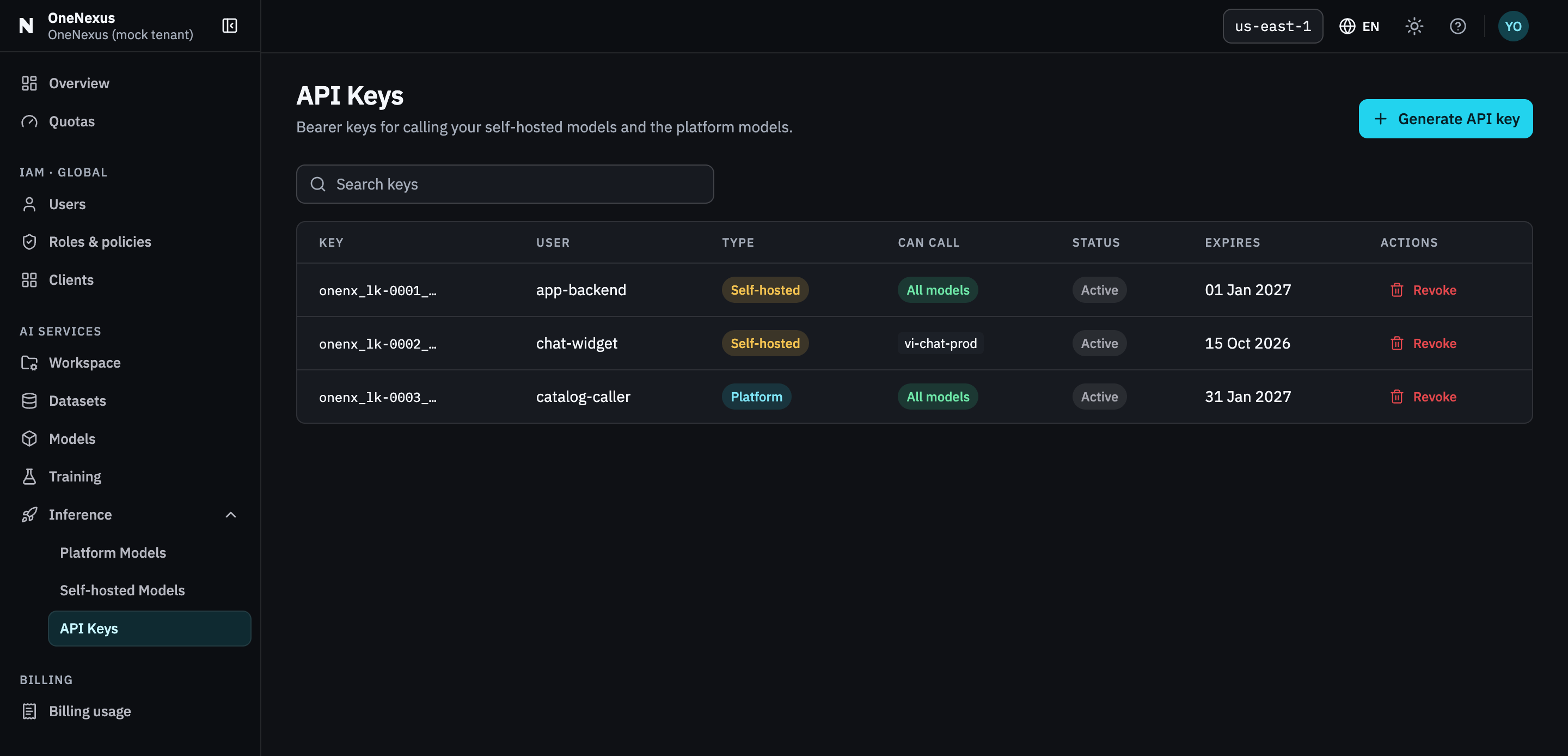
The Can call column is the one to read at cleanup time: it names the scope a key still authorizes.
For failures during these operations, use Troubleshoot self-hosted models.