Troubleshoot self-hosted models
Start with the failure boundary: a deployment problem happens before the public route is ready; a request problem happens after a client reaches an endpoint.
Deployment problems
Section titled “Deployment problems”| Symptom | Likely boundary | Next check |
|---|---|---|
| Set up your workspace replaces the page | The tenant has no workspace in this region | Create the workspace from that screen, Overview, or Workspace |
| Deploy model or another GPU action is read-only | Inference GPU quota is not allocated in the selected region | Check Quotas and the region in the header |
| A registry model version is missing from Your models | The version is not finalized or is not a servable full-weight artifact | Check the version state under Models |
| The model has no endpoint or usable cURL | The route is not ready | Wait for Running; inspect Logs and ready replicas |
The model is Failed | Provisioning or a lifecycle operation exhausted its recovery path | Read the status reason and Logs → Deploy diagnostics before changing configuration |
An edit remains Deploying | A new revision is still rolling | Compare ready/desired replicas and Logs; do not stack another edit blindly |
Delete ends in Delete failed | Teardown did not complete | Read the error and retry Delete, which is the recovery action for this state |
Provisioning has no universal completion time. Model size, asset download, Flavor, and runtime startup all affect it. Do not treat the create success notification as readiness.
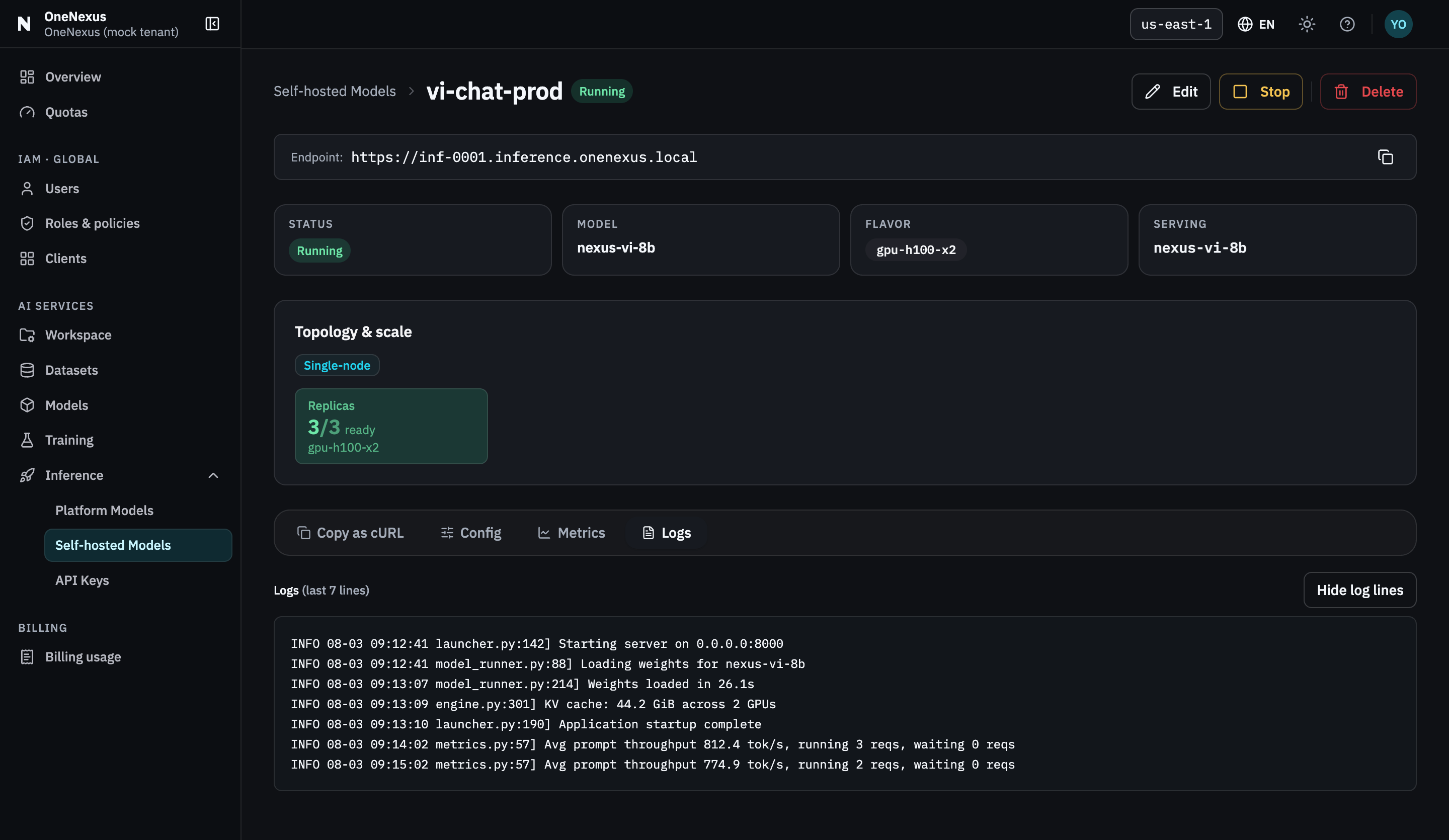
Logs carries both deploy diagnostics and serving output. Read it before changing any configuration.
Request problems
Section titled “Request problems”Use Copy as cURL as the source of truth for the endpoint, path and model value. Keep the key in the environment variable from the call guide, replace the generated command’s entire authorization header with -H "Authorization: Bearer $ONX_INFERENCE_API_KEY", then run it. This keeps the raw key out of shell history. If that command works, compare your application against it one value at a time.
| Result | What it means | What to do |
|---|---|---|
| DNS or connection failure | The request did not reach the serving API | Copy the endpoint again; check local DNS, proxy, and network policy |
401 | The bearer credential is missing or malformed | Send Authorization: Bearer <key>; create a replacement if the secret was lost |
403 | The credential was refused, or the Served Model Name is not currently routed | Check that the key is active, belongs to this tenant, and authorizes this host and Served Model Name. Confirm that a model with that name is Running, then recheck the generated request. |
404 | The URL or path is wrong | Use <Endpoint>/v1/chat/completions exactly as generated |
Validation 4xx | The request shape or option is not accepted | Reduce the request to the generated example, then add optional fields one at a time |
429 | The authenticated request-rate ceiling was reached | Retry a bounded number of times with exponential backoff and jitter |
503 | The serving path is temporarily unavailable | Check status, ready replicas, Metrics, and Logs; retry only a bounded number of times |
| HTTP success but no final text | The response may contain reasoning without final content, or the client read the wrong field | Inspect the full response and read choices[0].message.content; retry or adjust the request only after confirming the response shape |
Do not retry 401, 403, validation 4xx, or 404 unchanged. If a stream has emitted data, do not automatically replay the whole request.
Check the three-value tuple
Section titled “Check the three-value tuple”Most authorization and routing mistakes come from mixing one of these values:
- Endpoint from the model detail page;
- Inference API key authorizing that model’s Served Model Name; and
- exact Served Model Name from the same model.
Platform catalog values are different: the shared catalog host requires a Platform key and the exact model value from the expanded row’s cURL request. Do not substitute its Public model ID. See the API reference.
Selecting a model when creating an Inference key authorizes its Served Model Name, not only that one resource. A replacement in the same tenant that continues using the same Served Model Name also accepts the key. Delete does not revoke this authorization; revoke the key explicitly when access should end.
Known boundaries
Section titled “Known boundaries”- Open model documents public Hugging Face repositories in
owner/nameform. Private or gated repositories are outside this flow. - Each self-hosted model binds one model source at creation. The current Edit flow does not swap the model, Served Model Name, or Flavor.
- The Console exposes manual replica counts and explicit Stop/Restart lifecycle actions. Do not assume traffic-based autoscaling or scale-to-zero.
- OneNexus documents
POST /v1/chat/completions; support for optional fields can differ by model recipe and serving engine. Begin with the generated cURL. - No universal context, output-token, concurrency, request-rate, payload-size, or timeout value is published for every model. Use the model recipe and observed API response as the contract, and confirm workload-specific limits during onboarding.
Escalate with useful context
Section titled “Escalate with useful context”Include:
- tenant and region;
- the model’s resource name and current status;
- endpoint hostname, without credentials;
- Served Model Name;
- UTC timestamp and HTTP status;
- status reason, relevant diagnostic lines, and request identifier if the response provides one; and
- whether Copy as cURL succeeds.
Never include an API key, credential-bearing cURL, sensitive prompt, or customer data. Contact your onboarding owner or data-center@onemount.com.